Teams and Regions
Highlights
A new standardized model for structuring delivery groups and geographic areas across Resources, Projects, Phases, Time Off, and the Resource Plan. Replaces legacy Department and Location fields on Resources and Time-Off, extending Projects and Phases assignment with these, and enables clearer planning, segmentation, and reporting
What Changed
Two new standard objects have been introduced: Team and Region. These replace the previous Department (text field) and Location (picklist) fields on Resource records.
Team represents internal delivery teams and can be assigned to Resources, Projects, and Phases for structured reporting and operational tracking.
Region represents geographic areas and supports a two-level hierarchy (e.g., EMEA > UK). Regions are assigned to Resources, Projects, Phases, and Time Off records. Time Off records now require a Region, and the system applies Time Offs based on the Resource's Region plus any parent Region in the hierarchy.
The Resource Plan filters have been updated to use the new Team and Region lookups instead of the deprecated Department and Location fields. The "Group Resources By" functionality now uses Team instead of Department.
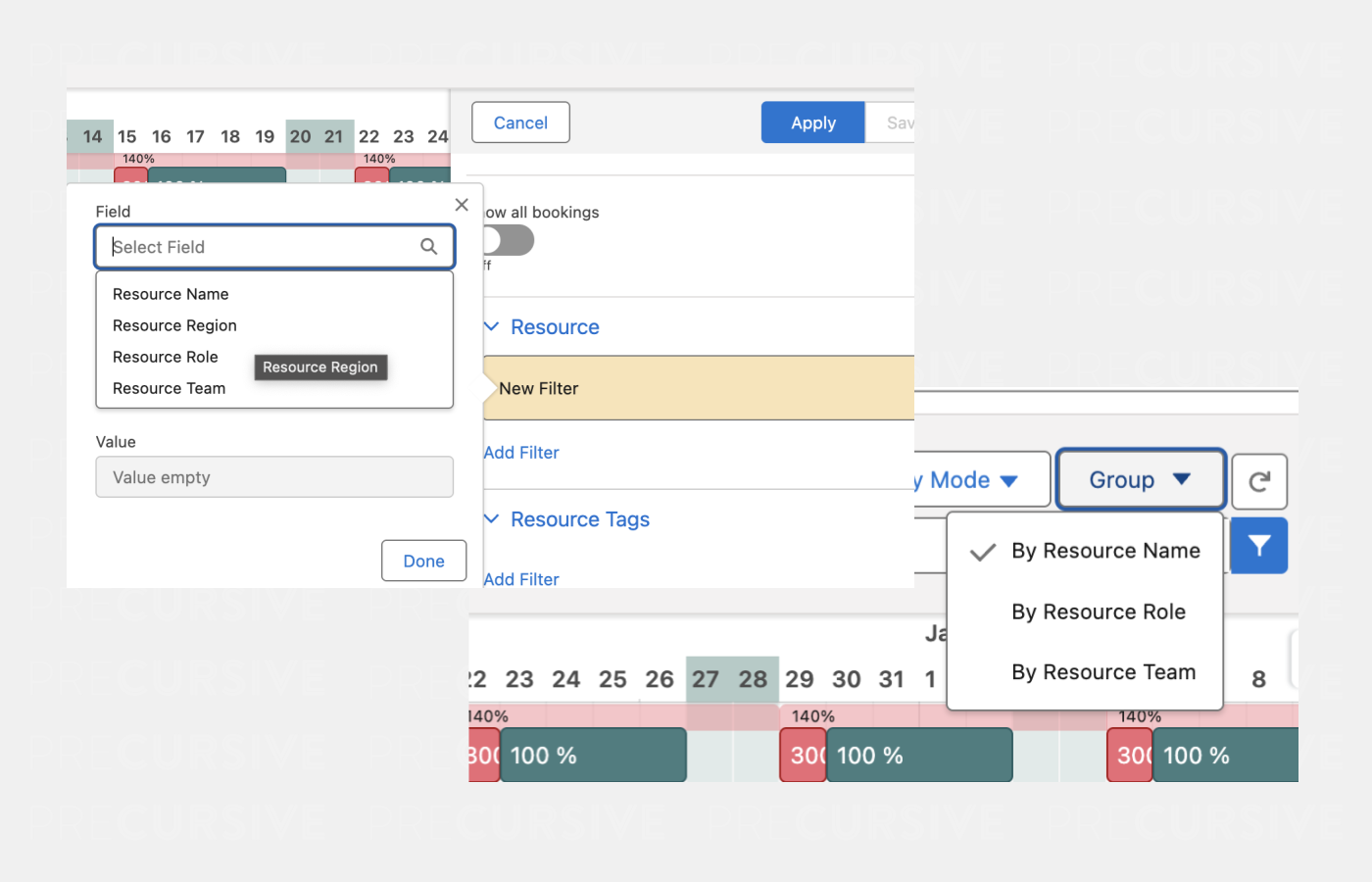
Default Reports and Dashboards got updated with all default Layouts for new installations. If you are using default ones or custom ones and upgrading, please check Enablement Guidance section for more details.
How It Works
For Resources:
- Each Resource can be assigned to one Team and one Region
- Time Offs are applied based on the Resource's Region and its parent Region (if applicable)
- Resources without a Region assigned will not have Time Offs applied automatically
For Projects and Phases:
- Team and Region fields are available for assignment
- These support filtering and reporting by delivery team or geographic area
For Time Off:
- Time Off records require a Region
- Time Offs apply to all Resources in that Region and any child Regions
- The validation rule prevents editing the Date and Region of existing Time Offs; delete and recreate if changes are needed
Region Hierarchy:
- Regions support two levels maximum (e.g., Global > EMEA or EMEA > UK)
- A Region cannot reference itself as parent
- Circular references are prevented (e.g., if EMEA > UK, then UK cannot become parent of EMEA)
Resource Plan:
- Filter by Region and Team using new lookup filters
- Group Resources by Team in the view options
Enablement Guidance
Automatic Migration (Out of the Box)
The migration process runs automatically during post-install and handles the transition from Location/Department to Region/Team. This ensures that post-upgrade, everything will be working without any required configuration:
- Location to Region migration:
- Unique Location picklist values used on Resource and Time Off records are automatically recreated as Region records
- A "Global" Region is created as the parent for all other Regions
- Resources with empty Location fields are assigned the Global Region
- Time Off records with empty Location fields are assigned the Global Region
- Resource.Region and Time Off.Region fields are populated based on previous Location values
- Department to Team migration:
- Unique Department text values used on Resource records are automatically recreated as Team records
- Resource.Team fields are populated based on previous Department values
- Field deprecation:
- Location and Department fields on Resource are marked as deprecated
- Location field on Time Off is marked as deprecated
If the migration did not complete successfully during post-install:
- Navigate to Precursive HQ > System Settings > Critical Updates
- Run the "Regions & Teams Data Migration" tile
- The tile shows "Deployed" status once migration is complete
Recommended Manual Steps
After upgrade, administrators should review and update the following where Location and Department fields were previously used:
- List Views:
- Update any custom List Views on Resource, Project, Phase, or Time Off that reference the deprecated Location or Department fields
- Replace with Region or Team fields as appropriate
- Page Layouts:
- The managed Resource layout is updated automatically
- Review custom page layouts and replace Location field with Region, and Department field with Team
- Reports and Dashboards:
- Update custom reports that group by or filter on Department or Location
- Standard reports have been updated to use Team and Region
- Report Types have been updated with new Region and Team fields on Project, Phase, and Resource objects
- New Objects in Precursive HQ:
- Teams and Regions are now accessible via Precursive HQ > Resources & Roles section
- Use these to manage your Teams and Regions, including setting up the Region hierarchy
Post Upgrade Recommended Configuration:
- Resource layout includes Region and Team fields (replacing Location and Department)
- Project and Phase layouts include Region and Team fields
- New Project/Phase field set includes Team and Region fields
Tasks Popovers for Bookings
Highlights
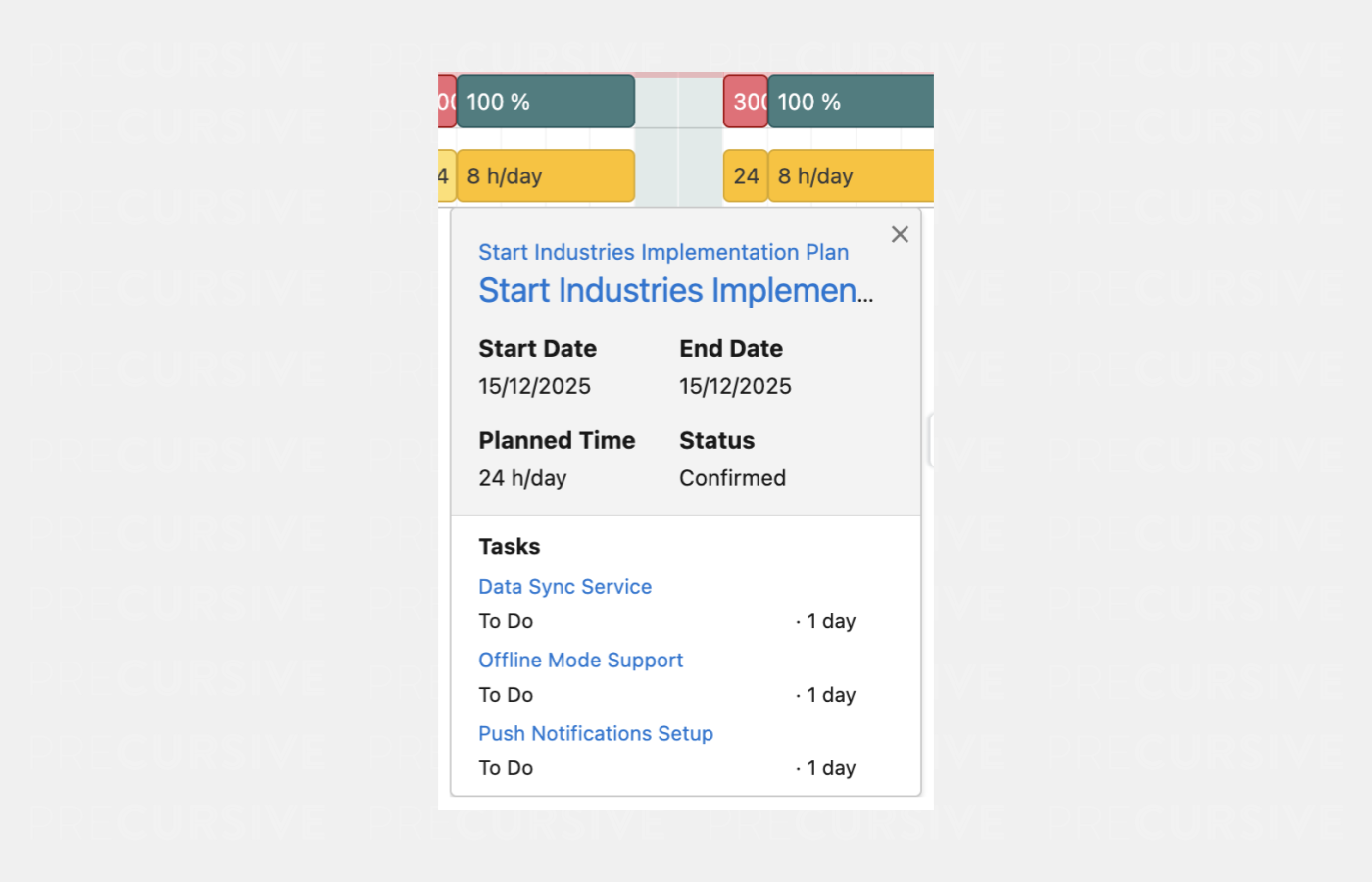
Hovering over a Booking in the Resource Plan now displays a detailed popover showing the Tasks that make up that Booking. Includes Project and Phase context, Start and End Dates, Planned Hours, and a scrollable list of all related Tasks with direct links.
What Changed
When hovering over a Booking on the Resource Plan, a new popover now displays comprehensive information about the Booking and its associated Project Tasks. This replaces the previous simple tooltip with a richer, more informative view.
How It Works
The popover shows the Project name, Phase name, Booking dates, Planned Hours (based on Capacity Mode selection), and Booking Status in the header section. Below this, a scrollable Tasks pane lists all Project Tasks that contribute to the Booking, including Task name, List name, and Duration.
Enablement Guidance
his feature is automatically available after upgrade - no configuration required.
Resource Plan Performance Boost
Highlights
Resource Plan now loads significantly faster by fetching Bookings on-demand when expanding individual Resources, eliminating timeout issues for organizations with large datasets. This means initial load will be between 40-70% faster, but you may see some loading when expanding Resources.
What Changed
The Resource Plan page has been optimized to address performance issues experienced by organizations with large numbers of Bookings. Previously, the page loaded all Participant and Booking data upfront, causing significant delays or timeouts when viewing 20+ Resources over extended time horizons.
How It Works
The initial page load now fetches only Resource and Availability data. Bookings are loaded individually when a User expands a specific Resource row. Weekly Availability calculations have been updated to use Availability records instead of Booking records, ensuring availability displays correctly without requiring Bookings to be loaded first.
The default number of Resources displayed per page has been increased from 25 to 50 for new installations and can be manually changed via Precursive Settings in Precursive HQ.
Enablement Guidance
This improvement is automatically available after upgrade - no configuration required.
Changing the number of Resources per page: Precursive HQ > Precursive Global Settings > Resource Rows to Load can be updated to 50.
Data Model
Below there are data model changes listed that enabled features described above.
New fields
| Object Label | Field Label | Field API Name | Field Type | Description |
| Phase | Region | preempt__region__c | Lookup (Region__c) |
Identifies the region this record is associated with
|
| Phase | Team | preempt__team__c | Lookup (Team__c) |
Identifies the Team this record is associated with
|
| Precursive Project | Region | preempt__region__c | Lookup (Region__c) |
Identifies the region this record is associated with
|
| Precursive Project | Team | preempt__team__c | Lookup (Team__c) |
Identifies the Team this record is associated with
|
| Precursive Protected Settings | Is Resource Location Department Migrated | preempt__isResourceLocationAndDepartmentMigrated__c | Checkbox | |
| Precursive Protected Settings | Is Time Off Location Migrated | preempt__isTimeOffLocationMigrated__c | Checkbox | |
| Region | Description | preempt__description__c | LongTextArea |
Additional details to clarify the scope or boundaries of this Region
|
| Region | Parent | preempt__parent__c | Lookup (Region__c) |
Optional reference to a parent region. Supports a two-level structure for geographic hierarchy
|
| Resource | Region | preempt__region__c | Lookup (Region__c) |
Identifies the region this record is associated with
|
| Resource | Team | preempt__team__c | Lookup (Team__c) |
Identifies the Team this record is associated with
|
| Team | Description | preempt__description__c | LongTextArea |
Additional context to distinguish this Team from others
|
| Time Off | Region | preempt__region__c | Lookup (Region__c) |
Identifies the region this record is associated with
|
Deprecated fields
Object: Resource (preempt__Resource__c)
- Department (preempt__department__c)
- Location Formula (preempt__locationFormula__c)
- Location (preempt__location__c)
Object: Time Off
- Location (preempt__location__c)
Review all Release Notes.